 Coherence Audio
User Manual
Welcome to Coherence Audio, the Windows multi-track audio recorder that captures every USB microphone as its own independent audio track — no aggregation drivers, no mixing, no compromises.
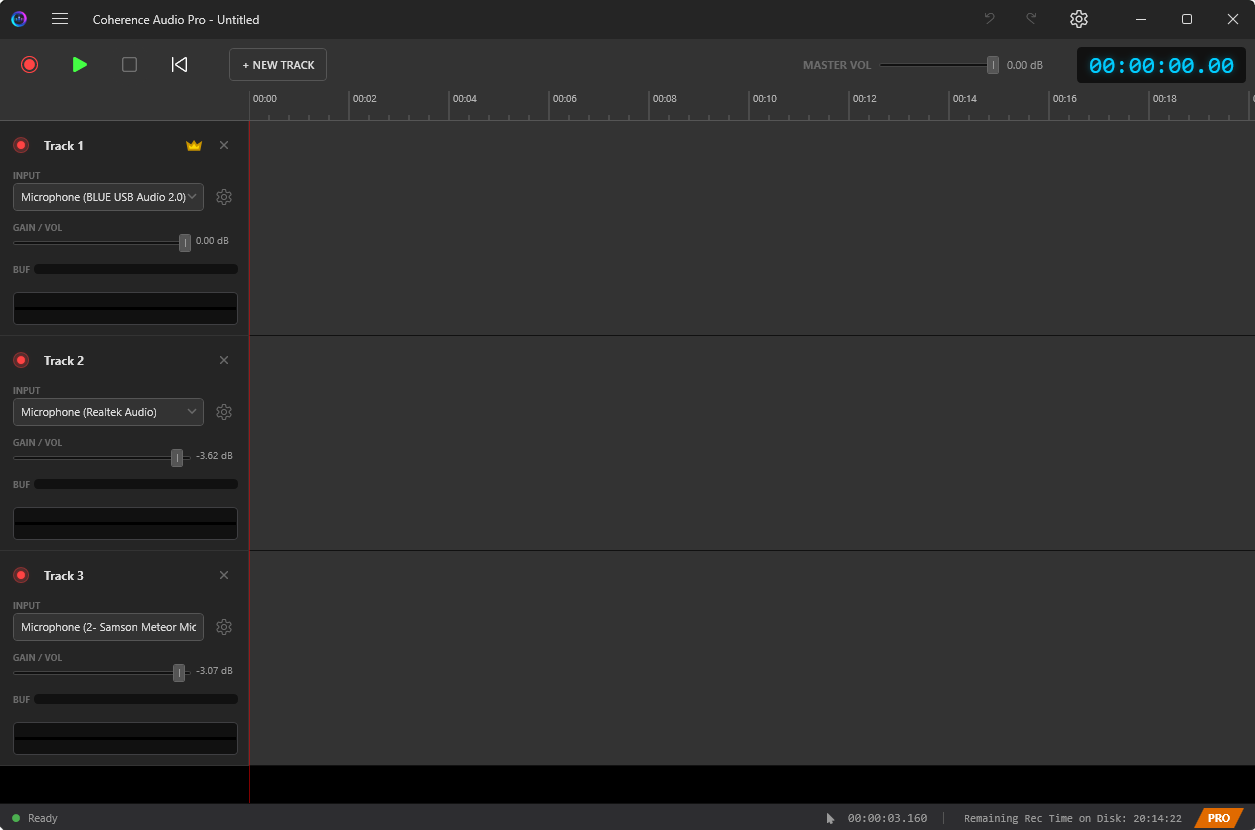
How to Use This Manual
If you are new to Coherence Audio, start with Getting Started and work through the chapters in order. Experienced users can jump directly to the chapter most relevant to their current task.
Chapters
| # | Chapter | What You Will Learn |
|---|---|---|
| 01 | Getting Started | System requirements, installing from the Microsoft Store, first launch, adding your first device, and completing your first recording |
| 02 | Recording | Device selection, per-device configuration, arming tracks, real-time VU meters, waveform monitoring, ring buffer protection, discontinuity detection, and USB hot-plug recovery |
| 03 | Clock Sync & Drift Correction | Why USB clocks drift, the three tiers of USB microphone clock quality, how Coherence Pro measures and corrects drift, how to designate a clock master, and practical accuracy expectations |
| 04 | Editing | Timeline navigation, selecting and moving clips, the Fine-Move dialog, copy / cut / paste, Paste-Insert, directing pastes to specific tracks, the Z-order layer system, the red squiggly overlap indicator, and undo / redo |
| 05 | Export | Exporting individual WAV stems, the Audacity LOF (List of Files) export, what an LOF file is, how to open it in Audacity, and recommended downstream workflows |
| 06 | Settings Reference | Complete reference for every Settings option: known device profiles, per-device sample rate / bit depth / channels / buffer / latency compensation / input gain, clock master selection, drift correction options, and workspace path |
| 07 | Use Cases | Step-by-step setup guides for four real-world scenarios: podcast interview, multi-instrument band tracking, piano close-mic plus room mics, and audiophile microphone comparison |
Quick Reference
The Core Concept
Most Windows recording software forces all microphones through a single aggregated device, producing a pre-mixed stereo file that cannot be separated in post-production. Coherence Audio takes a fundamentally different approach: every WASAPI-compatible audio device is opened as a completely independent recording stream. Each device is captured raw, unprocessed at its native sample rate and bit depth, and saved into a single self-contained .coh project file. There is no mixing, no summing, and no shared buffer between devices. Use File → Export → Audacity LOF to export individual .wav stems for use in your DAW.
Free vs. Pro Features
| Feature | Free | Pro |
|---|---|---|
| Unlimited tracks (device-limited) | ✓ | ✓ |
| Independent audio capture per device | ✓ | ✓ |
| Real-time waveform visualization | ✓ | ✓ |
| Per-track VU meters | ✓ | ✓ |
| Per-device sample rate, bit depth, gain, latency comp | ✓ | ✓ |
Project save / load (.coh) |
✓ | ✓ |
| Timeline editing, copy/paste, undo/redo | ✓ | ✓ |
| USB hot-plug recovery | ✓ | ✓ |
| Audacity LOF export | ✓ | ✓ |
| Automatic clock-drift correction | — | ✓ |
Keyboard Shortcuts at a Glance
| Shortcut | Action |
|---|---|
Space |
Play / Pause |
Ctrl+Z |
Undo |
Ctrl+Y |
Redo |
Ctrl+C |
Copy selected clip |
Ctrl+X |
Cut selected clip |
Ctrl+V |
Paste |
Ctrl+Shift+V |
Paste-Insert |
For the latest release notes and support, visit the Microsoft Store listing.